OSPF Neighbor Down: Area Mismatch
A healthy link, an empty OSPF neighbor table. Diagnose the mismatched area and fix it yourself, live, right below.
Symptom
Two routers ping each other fine across a direct link, but their OSPF adjacency refuses to form. Work it from Layer 3 up to the routing protocol.
Your mission
Prove the cause, then fix it
Format
Guided CLI investigation
Investigate before you configure.
Use the CLI evidence to isolate the fault, make the smallest safe correction, then verify the network state changed.
Observe the symptom and link state.
Diagnose by comparing the protocol evidence.
Verify the expected device state and confirm the original symptom is resolved.
Console access: R1 · R2
This workspace stacks for portrait phones. Rotate to landscape for the full split-screen console.
Need a hint?
Reveal the root cause when you're ready.
Try the investigation first, then use this as your escape hatch, not a dead end.
Lab debrief
Turn the session into a repeatable troubleshooting pattern.
Use this reference after your attempt: first explain the symptom, then verify the evidence, then confirm the repair.
The problem
Two routers on the same subnet come up fine and can ping each other directly, but their OSPF adjacency never forms. Neither shows up in the other's neighbor table, and nothing about the interface or IP configuration looks wrong.
What you'll practice
- Bring up a point-to-point OSPF adjacency between two routers
- Read show ip ospf neighbor and show ip ospf interface
- Recognize an OSPF area mismatch from a console log message
- Correct a mismatched area on an OSPF network statement
- Verify adjacency and OSPF-learned loopback reachability
1. Bring up a point-to-point OSPF adjacency between two routers
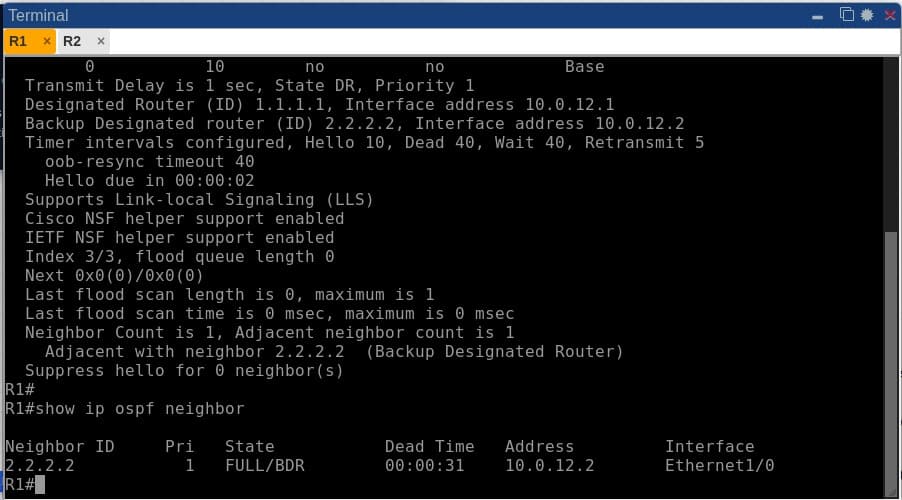
OSPF adjacency isn't binary. It moves through a real state machine (Down, Init, 2-Way, ExStart, Exchange, Loading, Full), and on a broadcast-type interface like Ethernet, two routers first negotiate a Designated Router (DR) and Backup DR before either side reaches Full. You'll learn to read that state directly out of show ip ospf neighbor instead of just checking 'is it up or down.'
2. Read show ip ospf neighbor and show ip ospf interface fluently
These two commands are where almost every real OSPF ticket starts. show ip ospf neighbor tells you who a router has (or hasn't) formed adjacencies with; show ip ospf interface tells you what that interface is actually configured to send in its Hellos, including area, network type, timers and cost. Fixing an adjacency problem is fundamentally a diff between these two on both ends of the link.
3. Recognize an OSPF area mismatch from a console log message
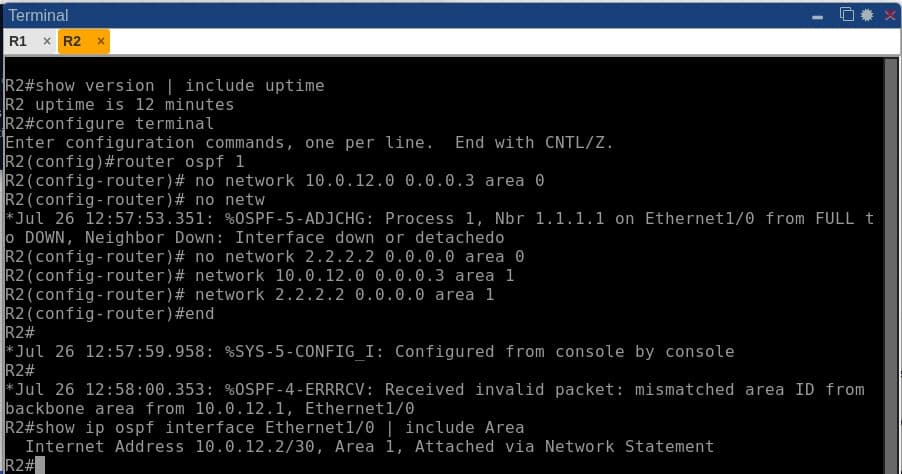
Cisco IOS doesn't stay silent when it rejects a Hello. It logs %OSPF-4-ERRRCV naming the exact reason the moment a packet with the wrong area ID arrives. Most engineers have never actually seen this message live, because it only appears at the instant of a real mismatch. You'll trigger it yourself and learn to treat the log buffer as a first-class diagnostic tool, not an afterthought.
4. Correct a mismatched area on an OSPF network statement
An OSPF network statement's area is set once, at the moment it's entered, and can't be edited in place. You have to remove the old statement and add the corrected one. This trips people up under exam and interview pressure alike. You'll practice the exact no network ... area X / network ... area Y sequence, and see the %OSPF-5-ADJCHG message confirming the adjacency re-forming in real time.
5. Verify adjacency and OSPF-learned loopback reachability
A ping succeeding proves nothing about which protocol is responsible for the route underneath it. You'll confirm the fix properly: check show ip ospf neighbor reaches Full, then read show ip route ospf and see the 'O' code on the learned route, rather than assuming a working ping means OSPF is doing its job.
The topology
R1 and R2 connect over a single point-to-point /30 link and each advertise a loopback into OSPF process 1, the minimum topology needed to isolate an adjacency problem to the routing protocol itself once Layer 3 is confirmed healthy.
Commands to run yourself
The real diagnostic commands for this lab, copy-paste ready. Run these in the same order to reproduce the investigation on your own session.
show ip interface briefping 10.0.12.2show ip ospf neighborshow ip ospf interface Ethernet1/1show logging | include OSPFshow ip route ospfInside a real session
More genuine captures from this lab running on the platform, at full size so the console text stays readable.
Frequently asked
What runs in the browser, and how does it differ from a live lab?
This page uses a focused browser simulation with modeled commands and device state. It is not a full device operating system. Dedicated virtual lab sessions are a separate product; check the available topology and booking details before purchasing live time.
Does this cover the CCNA 200-301 OSPF topics?
Yes. Forming a basic OSPF adjacency and troubleshooting why one won't come up are explicit CCNA 200-301 routing blueprint items, and this lab is scoped directly to that.
Ready to run this lab yourself?
No setup, no image sourcing. Book a session or ask for a live demo.