Access Control Lists: Configuring & Verifying
A router is denying traffic an ACL was written to allow. Diagnose the wildcard mask and fix it yourself, live, right below.
Symptom
PC1 can't reach a server through R1, and the router is sending back an explicit deny, not a timeout. The permit entry meant to allow it is right there in the ACL.
Your mission
Prove the cause, then fix it
Format
Guided CLI investigation
Investigate before you configure.
Use the CLI evidence to isolate the fault, make the smallest safe correction, then verify the network state changed.
Observe the symptom and link state.
Diagnose by comparing the protocol evidence.
Verify the expected device state and confirm the original symptom is resolved.
Console access: R1 · PC1 · SRV1
This workspace stacks for portrait phones. Rotate to landscape for the full split-screen console.
Need a hint?
Reveal the root cause when you're ready.
Try the investigation first, then use this as your escape hatch, not a dead end.
Lab debrief
Turn the session into a repeatable troubleshooting pattern.
Use this reference after your attempt: first explain the symptom, then verify the evidence, then confirm the repair.
The problem
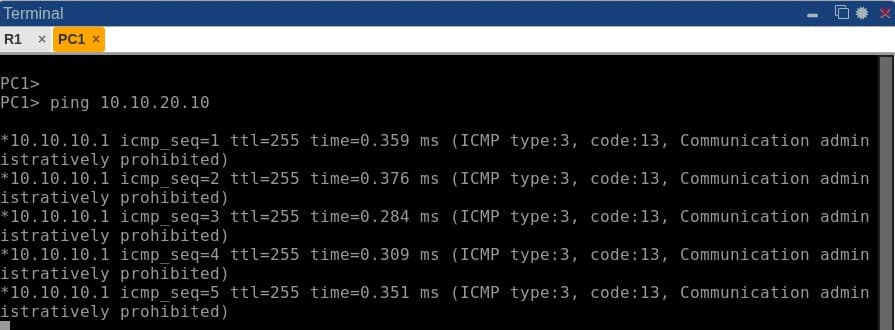
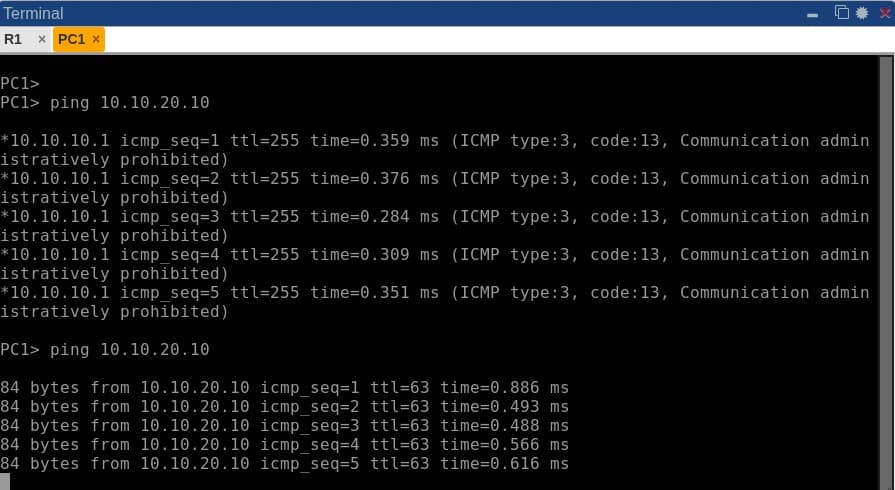
PC1 pings a server on the other side of router R1 and gets an explicit administratively-prohibited reply, not a timeout. An extended ACL on R1's LAN interface is supposed to permit that whole subnet through, and the permit entry is right there in the configuration.
What you'll practice
- Configure an extended ACL with permit/deny entries and wildcard masks
- Apply an ACL to an interface in the correct direction (in vs out)
- Read show access-lists and show ip interface to verify ACL placement
- Understand wildcard masks and how they differ from subnet masks
- Diagnose a host silently caught by an ACL's implicit deny
1. Configure an extended ACL with permit/deny entries and wildcard masks
An extended ACL entry matches on protocol, source, destination and (for TCP/UDP) port, evaluated top-down with an implicit deny at the end. The source and destination fields are followed by a wildcard mask, not a subnet mask, and IOS accepts either without complaint, so a typo here never throws an error. It just silently matches something other than what you intended.
2. Apply an ACL to an interface in the correct direction (in vs out)
The same ACL applied inbound versus outbound on the same interface filters completely different traffic. Inbound filters traffic entering the router through that interface, including traffic destined to the router's own IP, before any routing decision is made. Getting the direction or the interface wrong is the single most common ACL mistake, and the first thing worth ruling out before suspecting the ACL's own entries.
3. Read show access-lists and show ip interface to verify ACL placement
show ip interface reports which ACL is applied to an interface and in which direction. show access-lists (or show ip access-lists) shows every entry exactly as IOS actually stored it, which is not always exactly as you typed it. Reading that stored form literally, rather than assuming it matches your intent, is the fastest way to catch a wildcard mistake.
4. Understand wildcard masks and how they differ from subnet masks
A wildcard mask inverts subnet-mask logic: a 0 bit means the corresponding address bit must match exactly, a 1 bit means it doesn't matter. Typing a subnet mask (like 255.255.255.0) into a wildcard field is completely legal syntax, and IOS will silently normalize your address to match what the wildcard actually says, which is almost never the whole subnet you meant to permit.
5. Diagnose a host silently caught by an ACL's implicit deny
Every ACL ends with an implicit deny of everything not explicitly permitted. When a permit entry doesn't match the traffic you expected it to, for any reason, that traffic falls through to the implicit deny with no warning and no log entry unless you've explicitly configured one. You'll learn to recognize an explicit ICMP administratively-prohibited reply as the signature of exactly this, distinct from a routing failure or a down interface.
The topology
Router R1 sits between two subnets: PC1 on the LAN side, and SRV1 on a separate server segment. An extended ACL is applied inbound on R1's LAN-facing interface, the minimum topology needed to isolate an ACL misconfiguration to the access list itself once basic Layer 1-3 connectivity is confirmed healthy.
Commands to run yourself
The real diagnostic commands for this lab, copy-paste ready. Run these in the same order to reproduce the investigation on your own session.
show ip interface Ethernet1/0show access-lists LAN-TO-SRVping 10.10.20.10ip access-list extended LAN-TO-SRVpermit ip 10.10.10.0 0.0.0.255 anyInside a real session
More genuine captures from this lab running on the platform, at full size so the console text stays readable.
Frequently asked
What runs in the browser, and how does it differ from a live lab?
This page uses a focused browser simulation with modeled commands and device state. It is not a full device operating system. Dedicated virtual lab sessions are a separate product; check the available topology and booking details before purchasing live time.
Why does a permit entry that looks right still block traffic?
Wildcard masks are the inverse of a subnet mask, and typing a subnet mask into that field by habit is an extremely easy, completely silent mistake. IOS accepts it as valid syntax and just matches something other than the subnet you intended, so every host outside that narrow match falls through to the ACL's implicit deny.
Ready to run this lab yourself?
No setup, no image sourcing. Book a session or ask for a live demo.