Subnetting explained visually
Stop memorising disconnected rules. See how one line through 32 bits creates the network, host range and broadcast address.
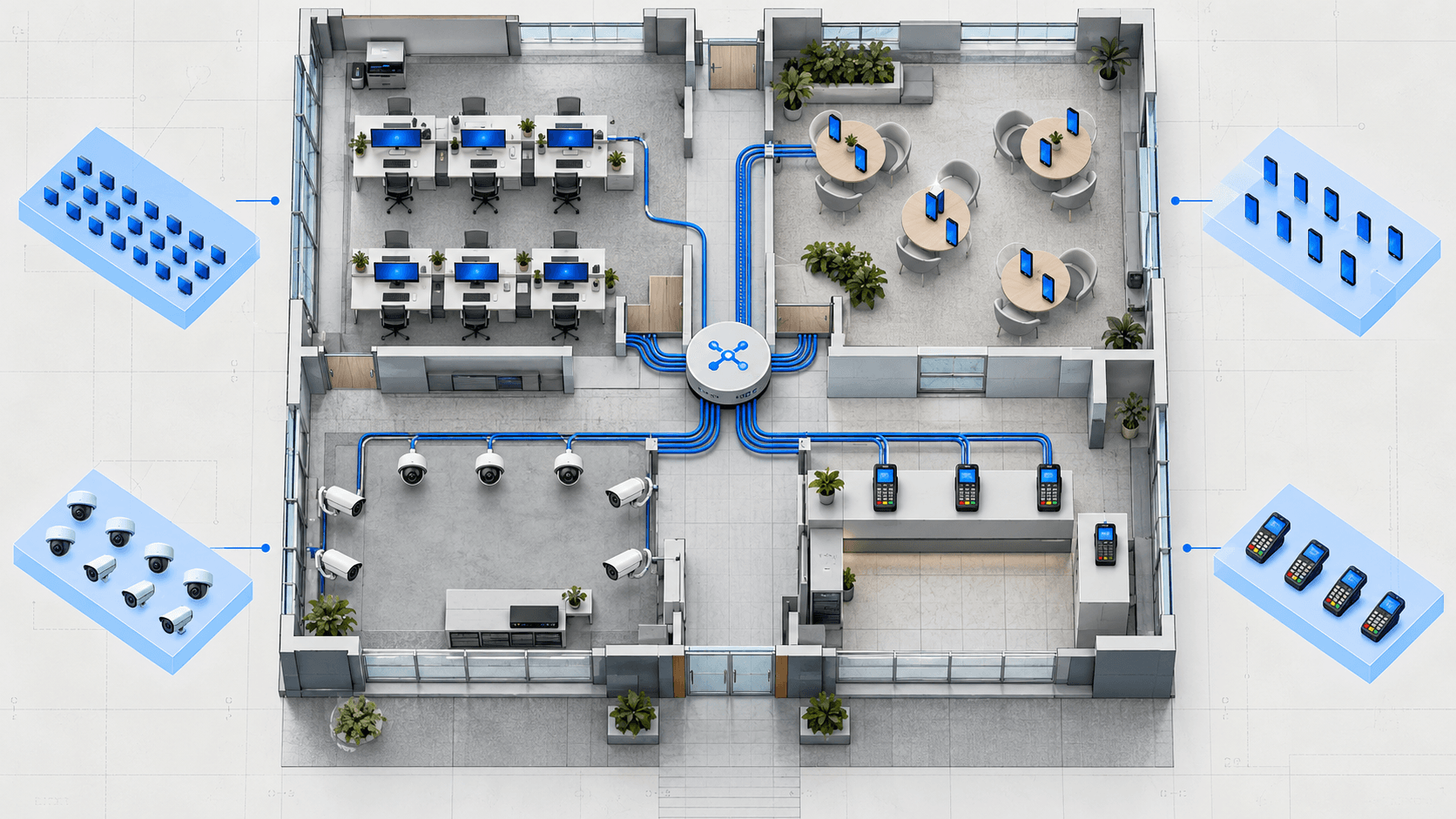
One router, four device groups, four broadcast boundaries.
Subnetting is the act of dividing an IP network into smaller networks. The arithmetic matters, but the idea is physical: you are deciding which devices can speak locally and when traffic must pass through a router.
Why subnetting exists
Imagine a shop with staff laptops, customer Wi-Fi, security cameras and payment terminals. Putting every device in one large network is easy at first, but it creates three problems.
Broadcasts travel farther
Every device in the broadcast domain has to inspect local broadcast traffic.
Security policy gets vague
Guest phones should not share a local network with payment terminals.
Addresses reveal less
A structured plan lets an engineer recognise a device group from its address.
Failures affect more devices
Smaller failure domains make faults easier to contain and diagnose.
A router stops the broadcast at the boundary
The moving packet reaches every device on the staff subnet, but it does not cross into guest or server networks.
STAFF 192.168.10.0/26
GUEST 192.168.10.64/27
On a switch, each of those groups usually becomes its own VLAN. VLANs explained shows how one switch keeps them apart.
The mask draws one line
An IPv4 address contains 32 bits. A prefix such as /26 says that the first 26 bits identify the network. The remaining six identify a host inside it.
More network bits create more subnets. More host bits create more addresses inside each subnet.
The prefix does not change the IP address. It changes how the address is interpreted. Use the visual below to keep the address fixed while moving the boundary.
Move the boundary through the final octet
The address stays 192.168.10.77. Only the prefix changes.
NETWORK
192.168.10.64/26
USABLE RANGE
192.168.10.65 to .126
BROADCAST
192.168.10.127
USABLE HOSTS
62
Worked example: 192.168.10.77/26
You can solve this without writing all 32 bits. Use the block-size method.
- 1
Find the mask octet
/26is255.255.255.192. The final octet is where the prefix ends. - 2
Calculate the block size
256 - 192 = 64. Networks therefore begin at 0, 64, 128 and 192. - 3
Locate 77
The value 77 sits between 64 and 127. The network address is
192.168.10.64. - 4
Mark the edges
Broadcast is
.127. Usable hosts run from.65through.126.
THE ANSWER
Network .64 | Hosts .65-.126 | Broadcast .127
What this looks like at work
A network engineer might receive 192.168.10.0/24 for a new branch. VLSM gives each group the smallest useful subnet instead of wasting an equal-sized block on everything.
| Use | Need | Allocation | Capacity |
|---|---|---|---|
| Staff | 50 devices | 192.168.10.0/26 | 62 hosts |
| Guest Wi-Fi | 25 devices | 192.168.10.64/27 | 30 hosts |
| Cameras | 12 devices | 192.168.10.96/28 | 14 hosts |
| Payment | 5 devices | 192.168.10.112/29 | 6 hosts |
The largest requirement is allocated first. That leaves the remaining address space contiguous, which makes future changes easier.
The same method works in the third octet
Consider 172.16.35.77/20. The mask is 255.255.240.0, so the interesting octet is the third one. The block size is 256 - 240 = 16.
Third-octet networks: 0, 16, 32, 48, 64 ...
35 falls in the 32-47 block

Network:    172.16.32.0/20
First host: 172.16.32.1
Last host:  172.16.47.254
Broadcast:  172.16.47.255
Nothing about the method changed. Only the octet in which you count changed.
The useful part of the cheat sheet
/24
254 usable
256 total
255.255.255.0
/25
126 usable
128 total
255.255.255.128
/26
62 usable
64 total
255.255.255.192
/27
30 usable
32 total
255.255.255.224
/28
14 usable
16 total
255.255.255.240
/29
6 usable
8 total
255.255.255.248
/30
2 usable
4 total
255.255.255.252
A /31 is a special point-to-point case where both addresses can be used. A /32 identifies one address.
Mistakes that break real networks
Assigning the network or broadcast address
In a conventional IPv4 subnet, neither edge belongs on a host interface.
Using the right address with the wrong mask
Two devices can look as if they share a network while disagreeing about which destinations are local.
Allocating small VLSM blocks first
This can fragment the free space until a later large subnet no longer fits.
Confusing wildcard and subnet masks
A /24 subnet mask is 255.255.255.0. Its wildcard inverse is 0.0.0.255.
Make it automatic
Use the visual calculator, generated questions and VLSM planner until you can find the network and broadcast without guessing.
Practise subnetting