VLANs, Trunking & Spanning Tree
A native VLAN mismatch is silently dropping traffic between two hosts on the same VLAN. Diagnose it and fix it yourself, live, right below.
Symptom
802.1Q trunks and native VLANs, STP root election, and inter-VLAN routing on a switched campus.
Your mission
Prove the cause, then fix it
Format
Guided CLI investigation
Investigate before you configure.
Use the CLI evidence to isolate the fault, make the smallest safe correction, then verify the network state changed.
Observe the symptom and link state.
Diagnose by comparing the protocol evidence.
Verify the expected device state and confirm the original symptom is resolved.
Console access: SW-DIST · SW-ACC1 · SW-ACC2 · PC1
This workspace stacks for portrait phones. Rotate to landscape for the full split-screen console.
Need a hint?
Reveal the root cause when you're ready.
Try the investigation first, then use this as your escape hatch, not a dead end.
Lab debrief
Turn the session into a repeatable troubleshooting pattern.
Use this reference after your attempt: first explain the symptom, then verify the evidence, then confirm the repair.
The problem
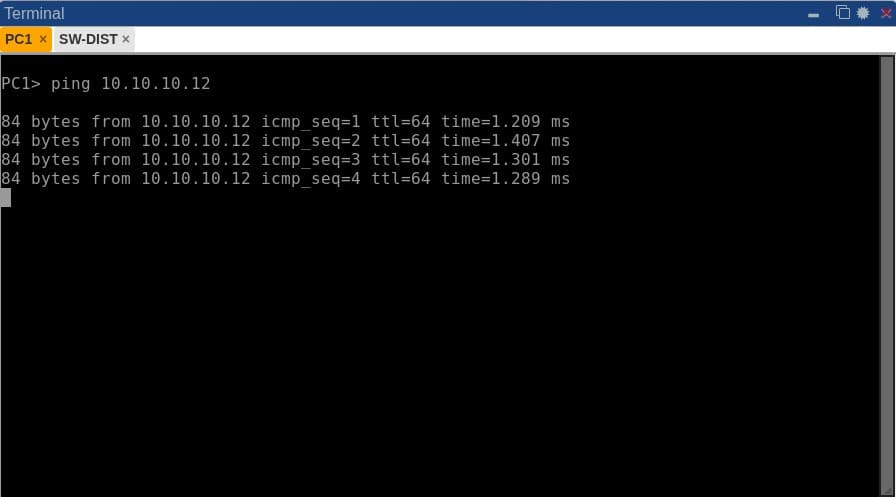
Two hosts sit on the same VLAN on different access switches, but they can't reach each other, even though both interfaces show up and no STP blocking is reported.
What you'll practice
- Configure 802.1Q trunks and set the native VLAN correctly
- Create and assign access VLANs across multiple switches
- Influence and verify Spanning Tree root election
- Configure inter-VLAN routing (router-on-a-stick or SVIs)
- Diagnose a VLAN mismatch or STP loop
1. Configure 802.1Q trunks and set the native VLAN correctly
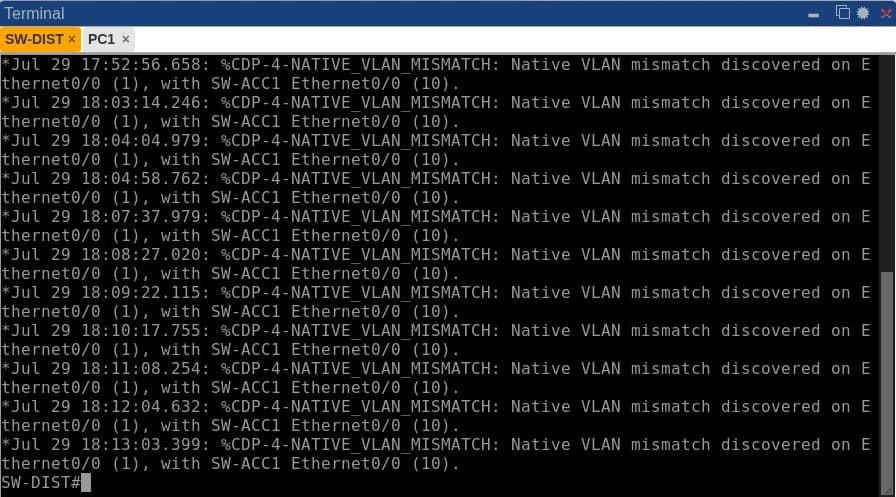
Trunks carry traffic for multiple VLANs using 802.1Q tagging. Untagged frames belong to the native VLAN. If native VLANs mismatch across a trunk, frames enter the wrong VLAN at the far end or trigger CDP native VLAN mismatch alerts.
2. Create and assign access VLANs across multiple switches
Access ports connect end hosts to specific VLAN broadcast domains. You will verify access port membership with show vlan brief and show interface switchport to ensure hosts are in their designated VLANs.
3. Influence and verify Spanning Tree root election
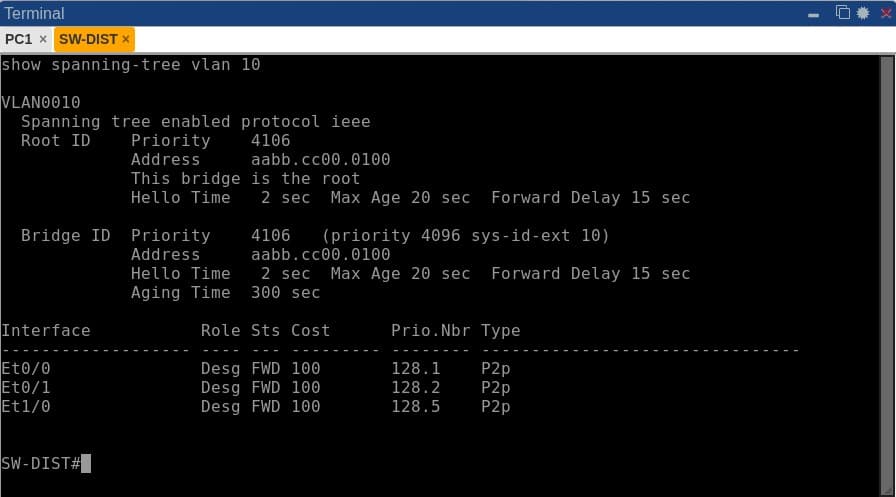
Spanning Tree Protocol (STP) prevents layer 2 loops by electing a Root Bridge based on bridge priority and MAC address. You will inspect root election and port states (Forwarding vs Blocking) across the campus switches.
4. Configure inter-VLAN routing with SVIs
Switched Virtual Interfaces (SVIs) on distribution switches provide Layer 3 default gateways for hosts on different VLANs, enabling inter-VLAN communication across the network.
5. Diagnose a VLAN mismatch or STP loop
You will use console logs, show interfaces trunk, and CDP alerts to spot trunk misconfigurations and restore end-to-end host reachability across the switched campus.
The topology
A three-switch campus topology, one distribution switch and two access switches with attached hosts, mirrors a small branch network, enough to see trunk negotiation, STP topology changes and VLAN routing interact for real.
Commands to run yourself
The real diagnostic commands for this lab, copy-paste ready. Run these in the same order to reproduce the investigation on your own session.
show vlan briefshow interfaces trunkshow interface switchportshow logging | include Nativeshow spanning-tree vlan 10Inside a real session
More genuine captures from this lab running on the platform, at full size so the console text stays readable.
Frequently asked
Is this enough for the CCNA 200-301 switching topics?
Yes. Trunking, VLANs, STP and inter-VLAN routing are core CCNA switching blueprint items, and this lab covers all of them hands-on.
What runs in the browser, and how does it differ from a live lab?
This page uses a focused browser simulation with modeled commands and device state. It is not a full device operating system. Dedicated virtual lab sessions are a separate product; check the available topology and booking details before purchasing live time.
Ready to run this lab yourself?
No setup, no image sourcing. Book a session or ask for a live demo.